 Docs Portal
Juniper Mist

The Juniper Mist connector integrates with the Juniper Mist cloud platform to bring wireless network infrastructure data into the Mapped graph. It discovers wireless access points, switches, and gateways from Mist sites and maps them to buildings and floors, continuously polling device status and occupancy metrics. Each access point is paired with an occupancy zone that tracks the number of connected wireless clients, providing real-time space utilization data. Optionally, the connector supports webhook notifications for occupancy alerts.
Use Cases
Potential use cases include:
- Occupancy estimation via connected clients: Monitor how many wireless clients are connected to each access point as a proxy for occupancy, useful for space utilization analysis and capacity planning.
- Network infrastructure visibility: See all Mist wireless access points, switches, and gateways across your portfolio, organized by building and floor.
- Device health monitoring: Track online/offline status of network devices in real time to identify outages or connectivity issues.
Configuration
Auth Requirements
In order to authenticate, the following is required:
- Juniper Mist API Token: An API token with organization or site-level permissions needs to be created from the Juniper Mist Portal. Juniper Mist: Create API Tokens
- Mist Region: Select the cloud region where your Mist organization is hosted (Global, Europe, APAC, or US Government).
- Organization ID: Your Mist organization UUID, found in the Mist dashboard under Organization > Settings.
- Webhook Secret (optional): A shared secret for validating webhook signatures, only needed if webhooks are enabled. Add a Webhook in the Juniper Mist Portal
Place Mappings
The connector associates Mist devices with Mapped places on the Location Mapping tab. The connector fetches all devices from sites you have access to (based on your API token's privileges) and pre-populates the mapping table.
| Field | Required | Description |
|---|---|---|
| building.siteId | Yes | The Site in your organization |
| building.name | Yes | Building name |
| building.address | Yes | Building address |
| building.refId | Yes | Mist Site UUID |
| subBuilding.name | No | Sub-building name (e.g., wing or section) |
| subBuilding.code | No | Sub-building code |
| floor.name | Yes | Floor name (from Mist map/floor plan) |
| floor.level | Yes | Numeric floor level |
| space.name | Yes | Space name |
| space.code | Yes | Space code |
| thing.name | Yes | Device name |
| thing.refId | Yes | Mist device UUID (unique) |
| thing.context | Yes | Device metadata including type (ap, switch, gateway), serial number, and MAC address |
Notes:
- Access points require floor information and a valid serial number to be provisioned.
- Switches and gateways are linked to buildings or sub-buildings.
- Floor information is automatically populated from the device's assigned Mist map when available..
Advanced Options
- Enable Webhooks: Enable real-time webhook notifications from Mist. When enabled, the connector registers a webhook with Mist for occupancy alert events. The default is disabled.
Mapped Concepts
Mist API to Mapped Entities
| Mist API Model | Mapped Entity | exactType | Description |
|---|---|---|---|
| Site | Building | Building | Mist sites are mapped to buildings in the graph. |
| Site (with sub-building mapping) | SubBuilding | SubBuilding | When a sub-building is specified in the place mapping, the site maps to a sub-building. |
| Map (floor plan) | Floor | Floor | Mist maps/floor plans are mapped to floors within a building. |
| Access Point | Occupancy Zone | Occupancy Zone | An occupancy zone is created for each access point and attached to the floor. The AP serves this zone. |
| Device (type: ap) | WirelessAccessPoint | WirelessAccessPoint | Mist wireless access points, linked to their assigned floor. |
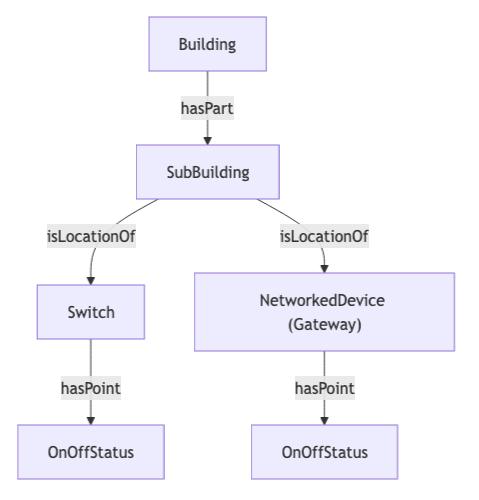
| Device (type: switch) | Switch | Switch | Mist network switches, linked to their building or sub-building. |
| Device (type: gateway) | NetworkedDevice | NetworkedDevice | Mist gateways, linked to their building or sub-building. |
Relationships:
- Each device has an ExternalIdentity using the device serial number scoped to the organization. Read more on Identities at Mapped.
- Access points are located on floors (Floor → isLocationOf → WirelessAccessPoint).
- Each access point has an associated OccupancyZone attached to its floor (Floor → hasPart → OccupancyZone).
- Access points serve their occupancy zone (WirelessAccessPoint → serves → OccupancyZone).
- Switches and gateways are located in buildings or sub-buildings (Building/SubBuilding → isLocationOf → Switch/NetworkedDevice).
Mist API to Mapped Points
| Mist Data | Mapped Point | exactType | ParentEntity | Datatype | Unit | Description |
|---|---|---|---|---|---|---|
| AP device status | OnOffStatus | OnOffStatus | WirelessAccessPoint | ENUM | NUM | Access point online/offline status. Values: 0 = disconnected, 1 = connected. |
| AP connected clients | ConnectedDevicesCountSensor | ConnectedDevicesCountSensor | OccupancyZone | INT | NUM | Count of wireless clients currently connected to the access point. Represents actual occupants (people with devices) in the AP's coverage area. |
| Switch device status | OnOffStatus | OnOffStatus | Switch | JSON | — | Switch status as a JSON object containing the status field. |
| Gateway device status | OnOffStatus | OnOffStatus | NetworkedDevice | JSON | — | Gateway status as a JSON object containing the status field. |
Notes:
- Access point status uses a numeric value map: 0 → "disconnected", 1 → "connected".
- The ConnectedDevicesCountSensor is attached to the OccupancyZone (not directly on the Access Point). It reflects the num_clients metric from the Mist API — the number of wireless clients actively associated with the AP.
- Switch and gateway status is reported as a JSON payload (e.g., {"status": "connected"}).
- Data is polled every 5 minutes.
Sample Code
Query latest device status for access points:
Note you'll need the connectorId of your Juniper Mist connector to execute this query. You can find this in the Mapped Console grid view under the Connectors tab.
Request ResponseCopy1 2 3 4 5 6 7 8 9 10 11 12 13 14 15 16{ points( filter: {exactType: {eq: "On_Off_Status"}, and: {connectedDataSourceId: {eq: "your-connector-Id"}}} ) { id name datatype valueMap series(latest: true) { timestamp value { int64Value } } } }
Query connected client counts over a time range:
Request ResponseCopy1 2 3 4 5 6 7 8 9 10 11 12 13 14{ points( filter: {exactType: {eq: "Connected_Devices_Count_Sensor"}, and: {connectedDataSourceId: {eq: "your-connector-Id"}}} ) { id name series(startTime: "2026-05-01T12:00:00Z", endTime: "2026-05-02T13:00:00Z") { timestamp value { int64Value } } } }
Graph Diagrams
Access Points with Occupancy Zones (linked to Floors)
.png)
Switches & Gateways (linked to Buildings)
.png)
Switches & Gateways with Sub-Buildings