Disruptive Technologies

This connector integrates with the Disruptive Technologies IoT sensor platform. Disruptive Technologies produces small, wireless sensors for environmental monitoring and space utilization — including temperature, humidity, CO₂, motion, and desk occupancy sensors. The connector ingests sensor data into the Mapped Graph, creating device entities with associated timeseries points that represent real-time and historical environmental and occupancy measurements.
Use Cases
- Environmental monitoring: Track temperature, humidity, and CO₂ levels across buildings and spaces to ensure occupant comfort and regulatory compliance.
- Space utilization: Monitor desk occupancy and motion activity to understand how spaces are used and optimize real estate decisions.
- Device health oversight: Monitor sensor battery status, network signal strength, and online/offline connectivity to proactively manage your sensor fleet.
Configuration
Auth Requirements
The connector supports two authentication methods. Choose the one that matches your Disruptive Technologies account setup.
| Method | Fields | Where to Find |
|---|---|---|
| OAuth2 (recommended) | Service Account Email, Account Key ID, Account Key Secret | In the DT Studio under your project's Service Accounts section. Create a Service Account, then create a Key to obtain the Key ID and Secret. |
| Basic Auth | Username (Key ID), Password (Secret) | Same location as OAuth2 — the Key ID is the username and the Key Secret is the password. |
Runtime Mode
| Mode | Description |
|---|---|
| Webhook (Real-time) | Default. Creates a DT Data Connector (HTTP_PUSH) for each project to receive real-time sensor events. Poll supplements webhooks with network signal strength data. |
| Polling (Scheduled) | Fetches full event history for all mapped devices every 10 minutes. No remote webhook is created. |
| # |
Advanced Options
| Option | Default | Description |
|---|---|---|
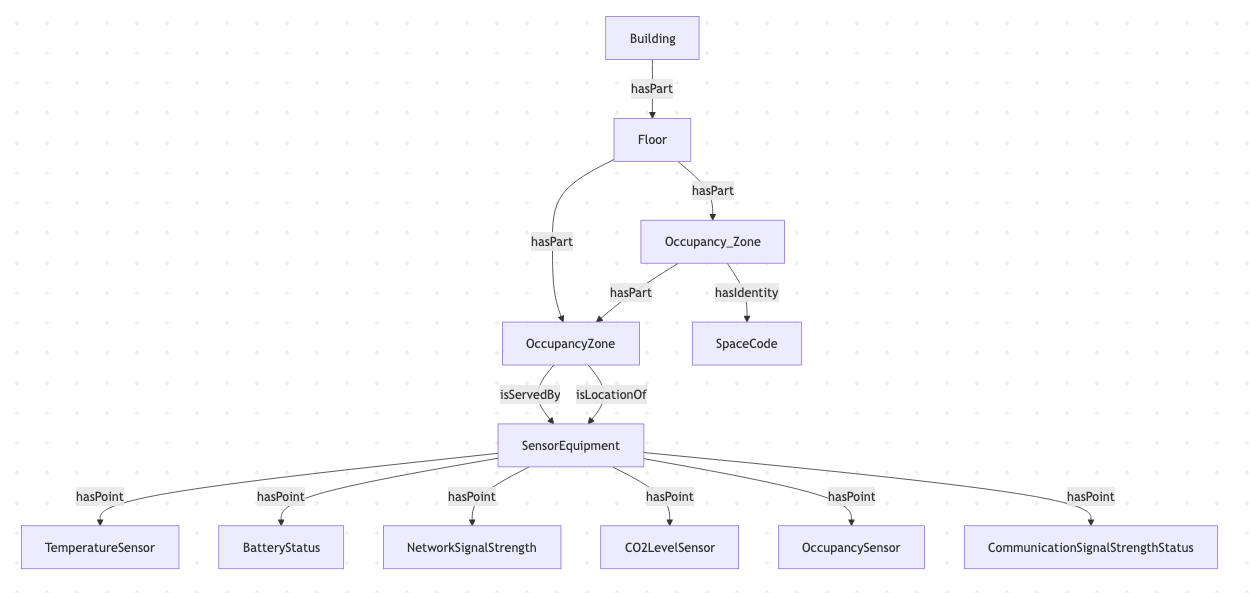
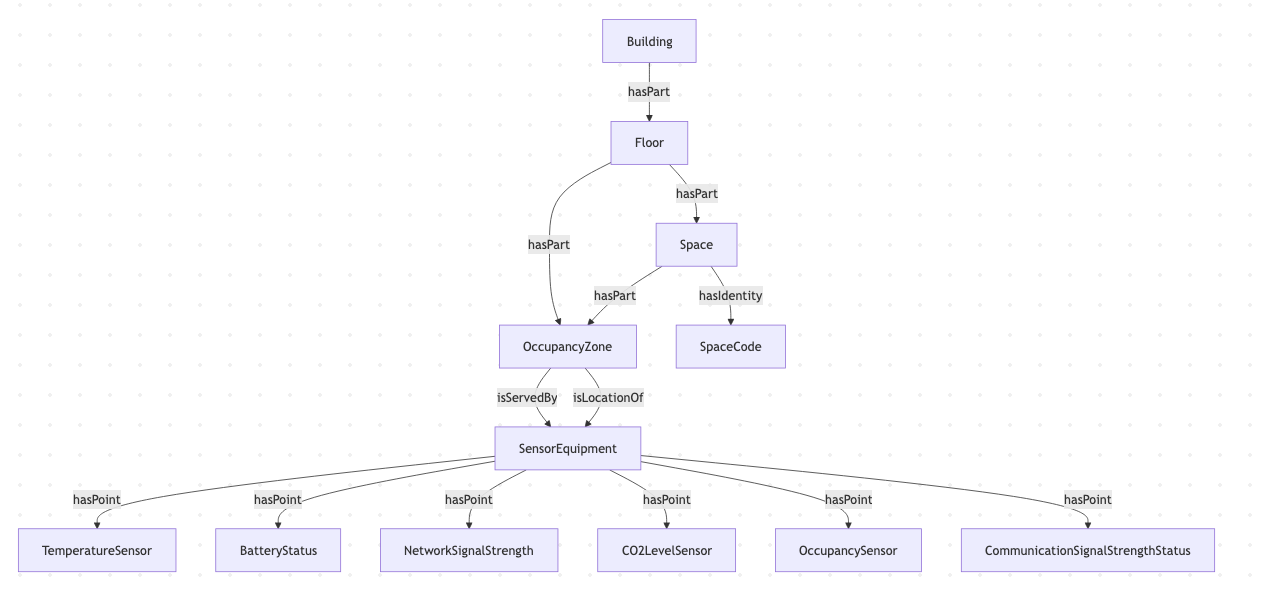
| Materialize Space as Zone | FALSE | When enabled, DT Spaces are represented as OccupancyZone entities in the Graph instead of Space. |
| Review the Graph diagrams below for examples of Materialize Space as Zone disabled and enabled. |
Place Mapping
The connector uses a mapping table to associate DT sensors with locations in the Mapped graph. When you select one or more DT projects, the connector fetches all supported devices and presents them for mapping.
| Field | Required | Description |
|---|---|---|
| building.siteId | Yes | The Mapped site ID for the building |
| building.address | Yes | Building address |
| building.name | Yes | Building display name |
| subBuilding.name | No | Sub-building name (if applicable) |
| subBuilding.code | No | Sub-building code |
| floor.name | Yes | Floor name |
| floor.level | Yes | Floor level number (0 = ground, negative = basement) |
| space.name | No | Space name (if omitted, device is placed at the floor level) |
| space.code | No | Space code |
| thing.refId | Yes (unique) | The DT device ID — auto-populated from the API |
| thing.name | Yes | Device display name — auto-populated as {type} - {deviceId} |
| thing.context | No (editable) | Device metadata including type and labels from the DT API |
Backfill
Backfill imports historical sensor events for devices that are already mapped, for example to recover a gap or to load history for a newly commissioned building. It is a manually triggered job, not automatic polling, and writes into the same points as the live feed.
| Option | Default | Description |
|---|---|---|
| Date Range | Last 7 days | The history window to import. There is no lower bound field: a start date older than the retention limit below is clamped to the oldest data DT can still serve, and the run reports that it did so. |
| Devices | All mapped devices | Backfill every device the connector maps, or narrow the run to specific Project IDs or Device IDs. Narrowing is the best way to recover a single building without spending DT's rate budget on the whole estate. |
| Window Size (days) (advanced) | 7 | The span of each history query. The default keeps the 31-day limit within 5 windows, which gives smoother progress reporting. |
| Devices in Parallel (advanced) | 4 (maximum 16) | How many devices are processed at once. Raising it mostly takes throughput away from live polling, because a shared rate limiter is the real ceiling. |
:::note 31-day retention limit Disruptive Technologies' API retains only 31 days of event history. This is a DT limit, not a Mapped policy. Anything older cannot be backfilled. The connector also holds back a small safety margin from the 31-day edge so that a long-running backfill does not fall off the retention boundary partway through. :::
Connector Log Messages
A poll cycle that fails, for example because the DT API is unavailable or Mapped does not accept the readings, is retried from the same point by the next cycle, so a temporary failure does not leave a gap in your sensor readings.
Beyond poll success and failure, the connector reports the following to your connector log. Each message is reported once per poll cycle (every 10 minutes) for as long as the condition lasts.
| Message | Level | When | What to do |
|---|---|---|---|
Device Missing ({deviceId} / {name}) - Please check place mapping for possibly decommissioned device | WARN | A device in your place mapping is no longer returned by Disruptive Technologies. Its heartbeat also reports NOT_OK ("Device not found") for as long as the mapping points at it. | The sensor was decommissioned or moved to a different DT project. Remove the mapping row, or re-map the device to the project it now lives in. |
Webhook missing for DT project {projectId}: Disruptive Technologies has no Data Connector sending this project's sensor events to Mapped, so sensor readings are not updating. Restart the connector to recreate it. | ERROR | Webhook mode only. DT has no Data Connector for this connector in the project, so no occupancy, motion or other sensor events are reaching Mapped. | Restart the connector: starting it recreates the Data Connector. If the message comes back, check in DT Studio (API Integrations → Data Connectors) what is removing it. |
Webhook disabled for DT project {projectId}: Data Connector {dataConnectorId} is {status} in Disruptive Technologies, so this project's sensor events are not reaching Mapped. Restart the connector to recreate it. | ERROR | Webhook mode only. The connector's Data Connector exists, but DT reports it as disabled and sends nothing through it. | Restart the connector: starting it replaces the Data Connector with a new, active one. |
Polling has not completed since {from}. Readings from {from} to {to} are no longer retried; to recover any that are missing, run Backfill Event History for that period (Disruptive Technologies keeps 31 days of history). | WARN | Polling mode only. No poll cycle has completed for more than 6 hours, and one cycle reads at most the last 6 hours. The period in the message grows until a cycle completes. | Run a Backfill (Backfill Event History) for the period in the message. Readings older than DT's 31-day retention can no longer be fetched. |
Mapped Concepts
API to Mapped Entities
| DT Concept | Mapped Entity | exactType | Description |
|---|---|---|---|
| DT Project | Building | Building | Each DT project maps to a building in the Mapped graph |
| DT Device (all types) | SensorEquipment | SensorEquipment | Each sensor device becomes a SensorEquipment entity |
| Space | OccupancyZone | OccupancyZone | Motion and desk occupancy sensors create an OccupancyZone that is part of the mapped Space or Floor |
API to Mapped Points
| DT Event Type | Point Name | exactType | Datatype | Unit | Value Description |
|---|---|---|---|---|---|
| temperature | Temperature | TemperatureSensor | DOUBLE | DEG_C | Temperature in degrees Celsius |
| humidity | Humidity | RelativeHumiditySensor | DOUBLE | PERCENT_RH | Relative humidity percentage |
| co2 | CO2 | CO2LevelSensor | DOUBLE | PPM | CO₂ concentration in parts per million |
| motion | Motion | OccupancySensor | ENUM | NUM | 0 = NO_MOTION_DETECTED, 1 = MOTION_DETECTED |
| deskOccupancy | Desk Occupancy | OccupancySensor | ENUM | NUM | 0 = NOT_OCCUPIED, 1 = OCCUPIED |
| batteryStatus | Battery Status | BatteryStatus | DOUBLE | PERCENT | Battery level percentage (all device types) |
| networkStatus | Network Signal Strength | CommunicationSignalStrengthStatus | DOUBLE | PERCENT | Network signal strength percentage (all device types) |
Relationships:
- Each
SensorEquipmenthasLocation → theSpace,Floor, orOccupancyZonewhere it is installed - For motion and desk occupancy sensors, the
SensorEquipmentserves → anOccupancyZone, which isPartOf → the parentSpaceorFloor - Each
SensorEquipmenthasPoint → its timeseriesPointentities (main sensor point + battery + network signal) - Each
SensorEquipmentand all its Points share a singleHeartbeatvia hasHeartbeat
Sample Code
Query latest sensor readings
{
  points(filter: { connectedDataSourceId: { eq: "your-connector-Id" } }) {
	    id
	    name
	    exactType
	    datatype
	    mappingKey
	    unit {
	      id
	    }
	    series(latest: true) {
	      timestamp
	      value {
	        float64Value
	      }
	    }
	  }
}
Query Occupancy Zones and their sensors
{
  zones(
	    filter: {
	      connectedDataSourceId: { eq: "your-connector-Id" }
	      exactType: { eq: "Occupancy_Zone" }
	    }
	  ) {
	    id
	    name
	    exactType
	    mappingKey
	    isServedBy {
	      id
	      name
	      hasPoint {
	        id
	        name
	        exactType
	        mappingKey
	      }
	    }
	    isPartOf {
	      id
	      name
	      exactType
	    }
	  }
}
Query sensor devices and their locations
{
  things(filter: { connectedDataSourceId: { eq: "your-connector-Id" } }) {
	    id
	    name
	    exactType
	    mappingKey
	    hasLocation {
	      id
	      name
	      exactType
	    }
	    hasPoint {
	      id
	      name
	      exactType
	      mappingKey
	      datatype
	      unit {
	        id
	      }
	    }
	  }
}
Graph Diagrams
Default - DT Space as Space
DT Spaces Materialized as Zones
With Materialize Spaces as Zones set to TRUE, the DT Space is rendered as a Zone.